Everything you need to manage classes, accept payments, and grow your client base—all at one transparent monthly price with no hidden fees. Includes the in-app AI assistant and ClassesBook AI Connector.
Two ways to use AI with ClassesBook. Every change is shown as a plan, and nothing is applied until you confirm.
Fitness Center plan
The in-app AI assistant is available when the studio owner is on the Fitness Center plan. It extends to that studio's members. Instructors can use it only for actions on that owner's classes, and only if that owner is on Fitness Center. Every change is shown as a plan and nothing happens until you confirm. This is the assistant inside the app, not ClassesBook AI Connector.
Available on all plans
Connect your AI assistant through a remote MCP server (Model Context Protocol, an open standard). It works with any MCP client that supports remote servers with OAuth, including Claude, Cursor, Grok Bot, GitHub Copilot in VS Code and Gemini CLI, and with ChatGPT on Business and Enterprise plans. Team or company plans of these tools may need an admin to enable custom connectors. Sign in with your ClassesBook account; no API keys. Owners, instructors, and members can connect. Members can book, cancel, and join waitlists. Every change is shown as a plan and is applied only after you confirm. There is no plan gate.

Create recurring classes effortlessly with our intelligent scheduling system. Edit single events or entire series with complete flexibility. Real-time updates keep everyone informed.

Accept both online and offline payments seamlessly. Connect your Stripe account for secure online processing—we charge zero transaction fees. Mix payment methods based on your needs.

Create unlimited class packages with flexible pricing. Choose which classes use packages and which don't. Support for both online and offline package purchases.

Prevent overbooking while maximizing capacity. Our smart waiting room automatically fills spots when cancellations occur, ensuring full classes and maximized revenue.

Send custom emails to individual clients or groups directly through the app. Handle special requests, send updates, and provide personalized service—all included at no extra cost.

Class reminders and booking notifications sent automatically. Unlike competitors who charge per email, all notifications are included in your monthly fee at no extra cost.

Track bookings, trends, and revenue with comprehensive analytics — including breakdowns by class and by instructor, packages sold, and payment history for online and offline transactions (when packages are in use).

Generate professional payment receipts with your logo and custom invoice numbering. Download a CSV payment report (Fitness Center plan) and control client access to receipts (Fitness Center plan).

Collaborate with other instructors and gyms to expand your offerings. Share schedules with partners while maintaining control over which clients access which classes (Fitness Center plan).

Monitor bookings from network partners and marketing collaborators. Track revenue from referrals and manage fair compensation automatically (Fitness Center plan).

Members can always cancel. You set a late-cancellation window in minutes. Inside it, the package credit is kept and you get an email; outside it, the credit is refunded automatically. Until you set a window, every cancellation is refunded.

Create custom questionnaires and liability waivers that appear automatically when clients join a class for the first time. Collect health information and legal agreements seamlessly.

Perfect for any fitness activity—yoga, pilates, CrossFit, dance, martial arts, and more. Unlimited activity types with full customization for your specific needs.
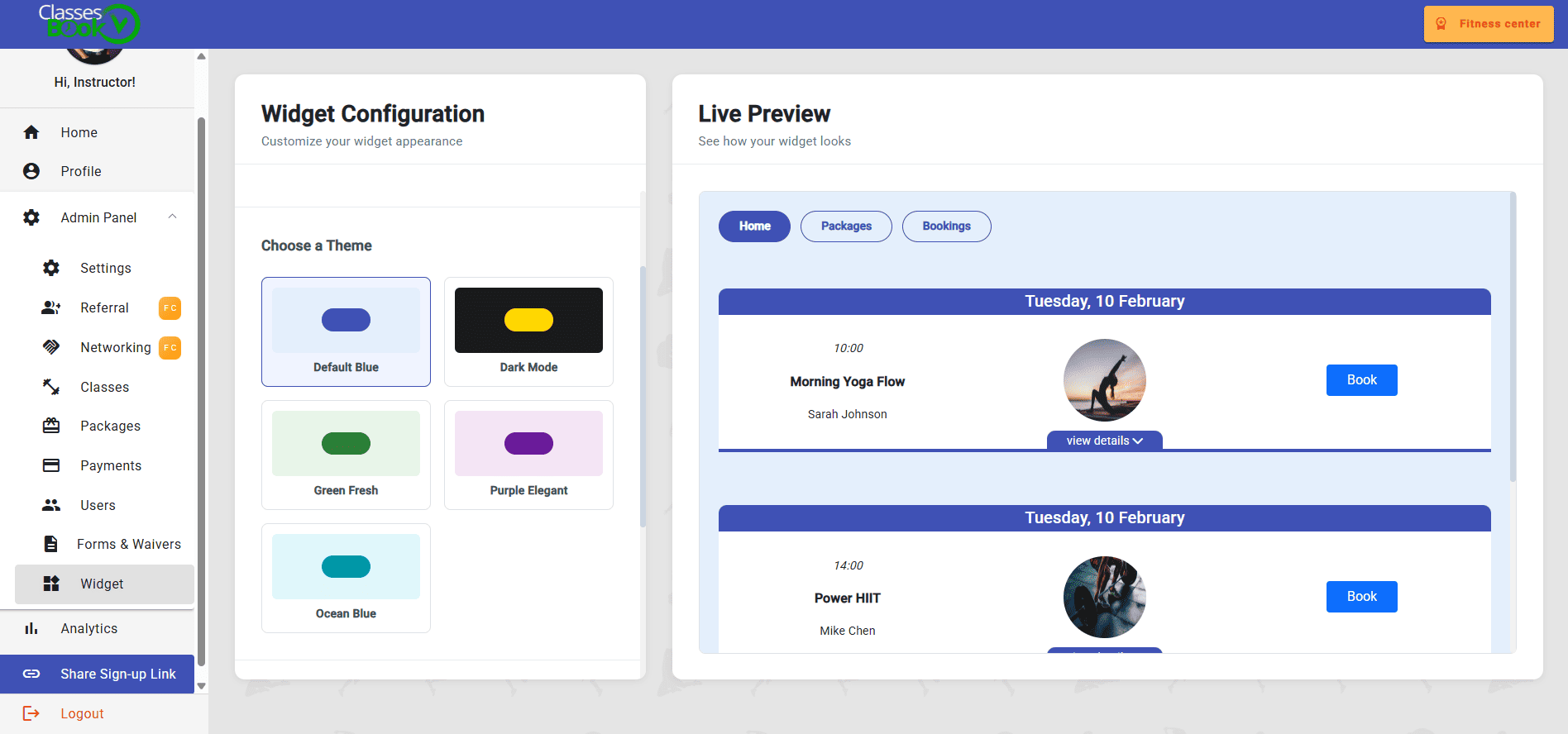
Embed a fully functional booking widget directly on your website. Let clients book classes, purchase packages, and manage their bookings without leaving your site. Learn more about the widget.
Invite instructors, give them their own menu and dashboard, and grant extra permissions that stay scoped to your studio.
Guided onboarding with a country picker. Studios sell in their own currency. Zero ClassesBook transaction fees.
One transparent monthly price includes all features. No per-email charges, no transaction fees from us, no hidden costs.
Connect your own Stripe account—we charge zero transaction fees. Only standard Stripe payment processing fees apply.
Optimized for mobile devices, ensuring your clients can book classes anytime, anywhere.
Try the Pro plan for 30 days. Checkout asks for a card. Cancel anytime with no obligations.
Get started in minutes and start accepting bookings immediately
Set up your classes with automatic recurring schedules. Add as many classes and packages as you need—everything is unlimited.
Connect Stripe with guided onboarding: pick your country and follow the Stripe Connect steps. Payments go to your studio in your currency. We never touch your funds, and we charge zero transaction fees of our own (standard Stripe processing fees still apply).
Share the invite link with your clients so they can book classes, purchase packages, and manage their bookings through their personal dashboard.
Monitor bookings, payments, and analytics in real-time. Send emails, manage receipts, and grow your business—all from one platform.
